DocsIntegrationsAI Suggestions

AI Suggestions

Nareli's AI-powered suggestion system analyzes your work patterns and generates intelligent recommendations for tasks, time entries, and workflow improvements.

Overview

The AI suggestion system is Nareli's intelligent productivity assistant. It observes your work patterns across multiple data sources, including Slack conversations and desktop activity, and generates actionable suggestions to help you keep your task list and timesheet accurate and complete. Unlike cloud-based AI assistants that send your data to remote servers, Nareli's suggestion engine runs entirely on your machine using Ollama, an open-source local LLM runtime. This means your work data, conversations, and activity patterns never leave your computer. The AI has the full context of your local work environment while maintaining complete privacy. Suggestions are designed to be helpful without being intrusive. They appear in a dedicated queue where you can review them at your own pace, and they integrate seamlessly into your day view alongside your manual time entries. The system learns from your accept and decline decisions over time, progressively improving the relevance and accuracy of its recommendations.

How AI Analysis Works

Nareli uses Ollama to run a large language model locally on your Mac. When data arrives from one of the configured sources, whether Slack messages or desktop activity logs, it is placed into an in-memory analysis queue. The queue processes items sequentially, sending each batch of context to the local LLM for analysis. The AI model receives the raw data along with contextual information about your existing projects, tasks, and recent time entries. This context allows the model to make informed decisions about what suggestions to generate. For example, if you have a task called "API refactoring" and the AI sees Slack messages about API changes, it can suggest updating that specific task rather than creating a duplicate. The analysis pipeline is designed to be resource-efficient. Processing happens in the background and does not interfere with Nareli's interface responsiveness. The queue system ensures that bursts of incoming data, such as a flurry of Slack messages, are processed smoothly without overwhelming the LLM or consuming excessive system resources.

Ollama must be installed and running on your Mac for AI suggestions to work. Nareli connects to Ollama's local API, typically at localhost:11434, to perform inference.

Suggestion Types

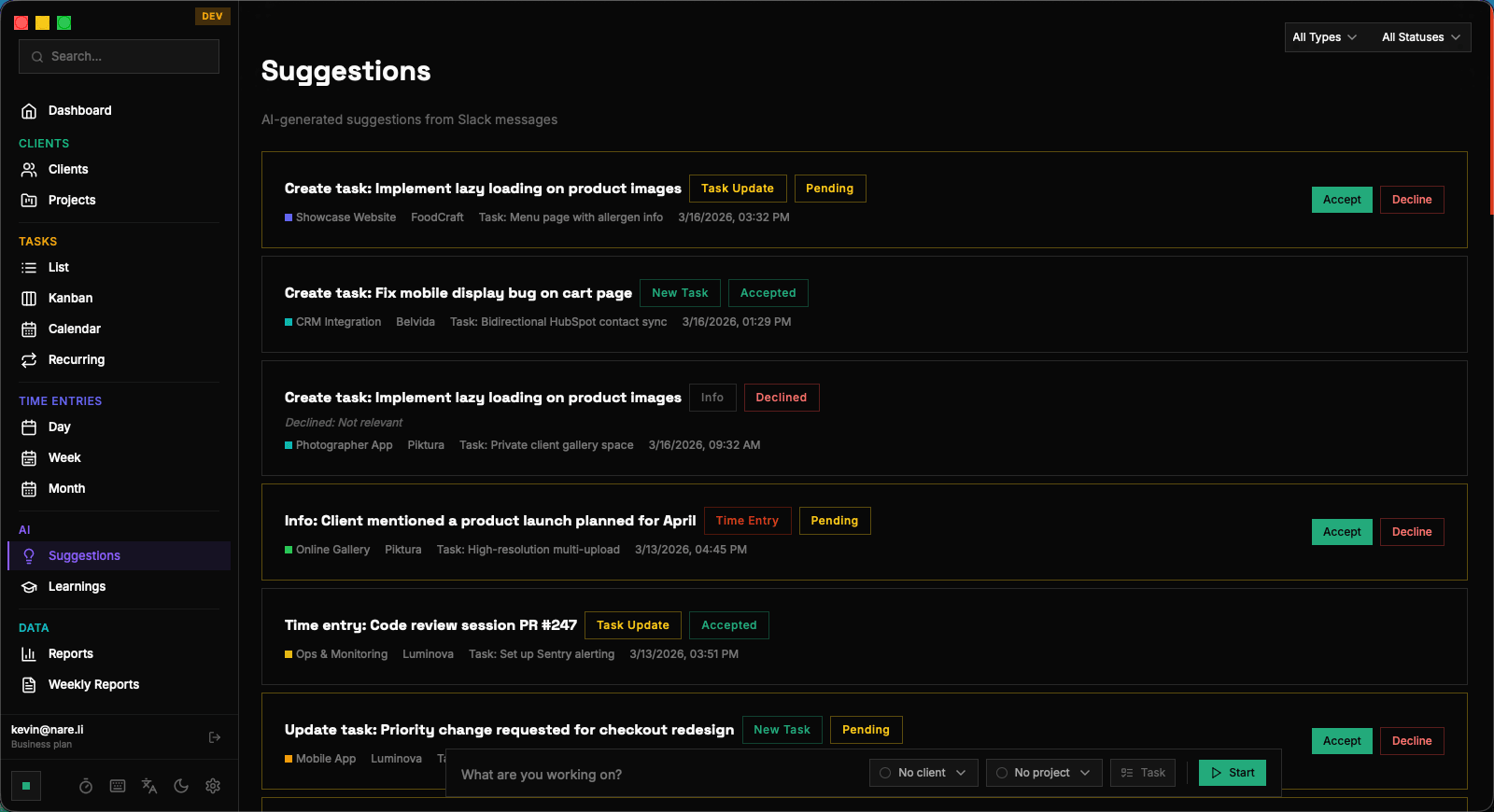
The AI generates four distinct types of suggestions, each serving a different purpose in your workflow. Task creation suggestions (task_create) recommend creating a new task based on work the AI has identified. These might come from Slack discussions about new deliverables, activity patterns that indicate a new workstream, or recurring work that has not yet been formalized as a task. Each suggestion includes a proposed title, description, and project assignment. Task update suggestions (task_update) propose modifications to existing tasks. The AI might notice new requirements discussed in a Slack thread, a status change implied by your activity patterns, or additional context that would be valuable to attach to an existing task. Accepting an update merges the new information into the existing task. Time entry creation suggestions (timeentry_create) are perhaps the most impactful type. The AI analyzes your activity patterns and Slack engagement to identify periods of work that you may not have logged. These suggestions include a proposed start time, duration, associated task, and description, making it easy to fill gaps in your timesheet. Informational suggestions (info) provide contextual awareness without requiring any action. They might summarize a decision made in a Slack channel, highlight a project status change, or surface a relevant piece of context you may have missed. These are designed to keep you informed, not to add items to your to-do list.

The suggestion type is displayed prominently on each suggestion card, so you can quickly scan your queue and prioritize which suggestions to review first.

Suggestion Workflow

Every suggestion begins in the pending state. Pending suggestions appear in your suggestion queue on the Suggestions page and as suggestion blocks in the day view. They are visually distinct from confirmed time entries and tasks, making it easy to distinguish AI-generated recommendations from your manual entries. When you review a pending suggestion, you have two options: accept or decline. Accepting a suggestion executes the proposed action. For a task_create suggestion, a new task is added to your task list. For a timeentry_create suggestion, a new time entry is recorded in your timesheet. You can preview and modify the details before confirming the acceptance. Declining a suggestion removes it from your active queue and marks it as declined in the system. Declined suggestions are not deleted; they are retained as training signals that help the AI learn your preferences. Over time, the pattern of what you accept and decline shapes the AI's behavior, reducing irrelevant suggestions and increasing the accuracy of the ones it generates. The workflow is designed to be low-friction. You can batch-review suggestions at the end of your day, or address them as they arrive via system notifications. There is no penalty for letting suggestions sit in the queue; they remain available until you act on them.

Suggestions in the Day View

The day view is where suggestion blocks are most naturally integrated into your workflow. When you open the time entries page for a specific date, suggestion blocks appear alongside your confirmed time entries on the timeline. They are rendered with a distinct visual style, typically with a different background color or border, to differentiate them from entries you have manually created. Suggestion blocks in the day view include the proposed time range, the associated task or project, and a brief description generated by the AI. This contextual placement makes it easy to evaluate suggestions: you can see exactly where a proposed time entry fits within your day and whether it overlaps with existing entries. The overlap detection system automatically handles conflicts between suggestions and existing time entries. If a suggestion proposes a time range that overlaps with a confirmed entry, the suggestion block is adjusted or flagged so you can see the conflict before accepting. This prevents accidental double-booking of time and ensures your timesheet remains accurate.

You can accept a suggestion directly from the day view by clicking the accept button on the suggestion block. This is often faster than navigating to the dedicated Suggestions page.

Learning from Your Patterns

Nareli's AI does not just generate suggestions; it learns from your behavior to improve over time. The learning system is built around the concept of fingerprints, which are patterns extracted from your accept and decline decisions. Fingerprints capture the characteristics of suggestions you tend to accept: which types of suggestions, which projects, which times of day, which Slack channels, and which kinds of activities correlate with accepted versus declined recommendations. The AI uses these fingerprints as additional context when generating new suggestions, biasing its output toward patterns you have historically found valuable. You can view your accumulated fingerprints and learning statistics on the Learnings page, accessible from the sidebar. This page shows the patterns the AI has identified, the number of fingerprints collected, and statistics about your suggestion acceptance rate. The transparency of this system means you always know what the AI has learned about your preferences and can clear the learning data if you want to start fresh. The learning process is gradual and conservative. The AI does not make dramatic changes to its behavior based on a single accept or decline. It requires consistent patterns over multiple interactions before adjusting its recommendations, ensuring stability in the suggestion quality.

System Notifications

Nareli can notify you when new suggestions are generated, so you do not need to constantly check the Suggestions page. These notifications are delivered through the native macOS notification system via Tauri's notification API, appearing in your notification center just like any other system notification. When a new suggestion is created, Nareli publishes a real-time event through its subscription system. The desktop app listens for these events and triggers a system notification with the suggestion type, a brief preview of the content, and the source that generated it. Clicking on the notification opens Nareli and navigates to the relevant suggestion. Notification preferences can be configured in Settings. You can enable or disable suggestion notifications entirely, or configure them per suggestion type if you only want to be notified about certain kinds of recommendations. For example, you might want notifications for time entry suggestions but not for informational ones. The notification system is designed to respect your focus. Notifications follow your macOS Do Not Disturb and Focus Mode settings, so they will not interrupt deep work sessions. They serve as gentle prompts to review your suggestion queue when you have a natural break in your workflow.

System notifications require the notification permission to be granted to Nareli in macOS System Settings. You will be prompted to grant this permission on first launch.

Privacy and Local Processing

Privacy is foundational to Nareli's AI suggestion system. Every component of the pipeline runs locally on your machine, and no data is ever sent to external servers for processing. The AI model runs through Ollama, which executes the language model directly on your Mac's hardware. Your work data, including Slack messages, activity logs, task descriptions, and time entries, is processed entirely within the local Ollama instance. The model weights are stored on your machine, and inference happens locally without any network calls to cloud AI services. Suggestion data, learning fingerprints, and all derived analytics are stored in Nareli's local SQLite database. There is no cloud sync, no telemetry on suggestion content, and no remote processing of any kind. Your productivity data remains exclusively under your control. This local-first architecture means the AI suggestion system works offline, has no usage limits or API costs, and provides consistent performance regardless of your internet connection. The only requirement is that Ollama is installed and running on your machine with a compatible model loaded.

You can choose which Ollama model to use for analysis. Larger models produce more nuanced suggestions but require more RAM and processing time. Start with a smaller model and upgrade if you want higher-quality recommendations.

AI Suggestions | Nareli