DocsFeaturesGoals & Streaks

Goals & Streaks

Set daily and weekly hour targets, build productive streaks, and visualize your progress over time.

Overview

Goals and streaks in Nareli help you build consistent work habits by setting concrete hour targets and tracking your progress over time. Rather than relying on willpower alone, the goals system gives you clear, measurable benchmarks that turn time tracking into a feedback loop for personal productivity. The system is built around two simple concepts: goals define how many hours you want to work in a given period, and streaks measure how many consecutive days you have met your daily target. Together, they provide both the direction and the motivation to maintain productive routines.

Goals are personal productivity targets, not billing requirements. They are designed to help you understand and improve your own work patterns.

Setting Daily Hour Targets

A daily hour target defines how many hours of tracked time you aim to log each day. To set your daily target, navigate to Settings and look for the Goals section. Enter your desired number of hours as a decimal value. For example, set 6.5 for six and a half hours of focused work per day. Choose a target that reflects your realistic productive capacity, not the total number of hours you spend at your desk. Most knowledge workers find that 5 to 7 hours of genuinely focused, trackable work is a healthy and sustainable daily target. Setting an unrealistically high target leads to frustration, while setting it too low removes the motivational benefit. Once set, your daily target appears as a progress indicator on your dashboard. As you log time entries throughout the day, the progress bar fills up, giving you an at-a-glance view of how close you are to reaching your goal. When you meet or exceed your target, the indicator changes to reflect your achievement.

Your daily target applies to all days equally by default. If you work fewer hours on certain days, consider setting your target to match your lightest expected workday and treating anything above that as a bonus.

Setting Weekly Hour Targets

The weekly hour target complements your daily goal by providing a broader view of your productivity. While daily targets encourage consistency, the weekly target accounts for the natural variation in workdays. You might have a light Monday but a packed Thursday, and the weekly target lets that balance out. Set your weekly target in the same Goals settings section. A common approach is to set the weekly target slightly below your daily target multiplied by five, giving yourself a buffer for meetings, administrative work, or days that are simply less productive. The weekly progress tracker shows your cumulative tracked hours for the current week alongside your target. This view is especially useful on Fridays when you want to see whether you need to push through a final focused session or whether you have already met your weekly commitment. The week resets according to your configured start-of-week day, which defaults to Monday.

Daily and weekly targets work independently. You can set one without the other, or use both together for layered accountability.

How Streaks Work

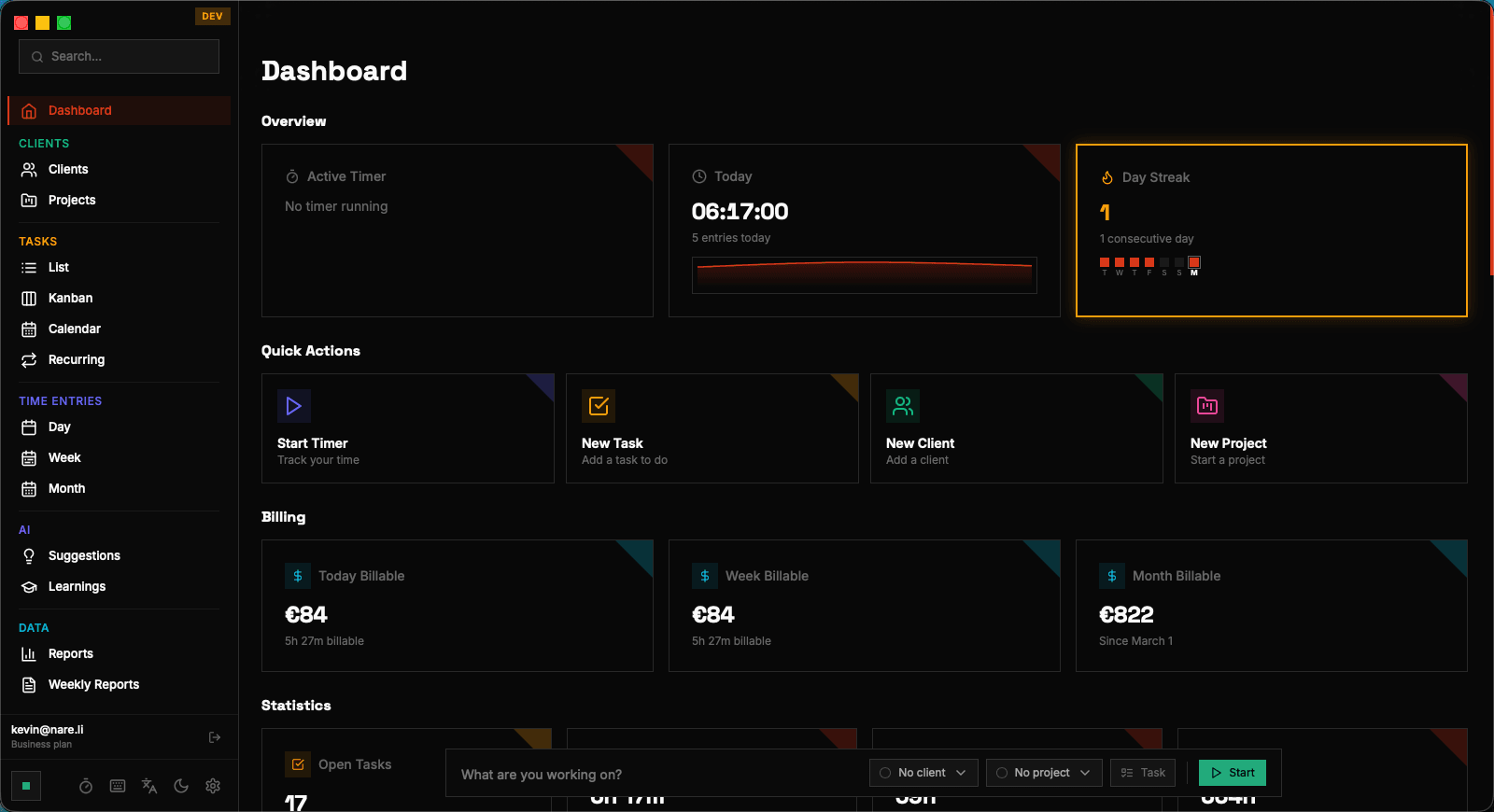
A streak counts the number of consecutive days on which you have met your daily hour target. Every day that you log enough tracked time to reach your daily goal, your streak increments by one. If you miss a day, the streak resets to zero. Streaks are calculated based on your configured timezone, so the day boundary aligns with your actual workday. Weekends and days you have not configured as working days can be excluded from streak calculations depending on your settings, so taking Saturday and Sunday off will not break a streak built on weekday consistency. The streak counter is prominently displayed on your dashboard, providing a constant visual reminder of your current momentum. Research on habit formation shows that tracking streaks is one of the most effective motivational tools: the longer your streak, the stronger your desire to maintain it. Even a modest streak of five or ten days creates a powerful psychological incentive to keep going.

If you are on vacation or taking planned time off, you can pause your streak tracking to avoid breaking a hard-earned streak for non-work days.

Visual Streak Tracking on the Dashboard

The dashboard provides several visual elements to track your goals and streaks at a glance. The primary streak display shows your current streak count along with your longest streak ever, giving you both a sense of current momentum and a high-water mark to beat. A daily progress ring or bar shows how much of your daily target you have completed so far today, updating in real time as you log new time entries. The visual fills proportionally, so you can quickly gauge whether you are on track, ahead, or behind at any point during the day. The weekly view extends this to a seven-day overview, showing each day of the current week with its tracked hours relative to the daily target. Days where you met your target are highlighted, making it easy to spot patterns in your productive days versus your lighter ones. This weekly rhythm view is one of the most-used dashboard widgets for users who track goals consistently.

The dashboard widgets update in real time. As soon as you stop a timer or save a time entry, your goal progress and streak count refresh automatically.

Goal Progress Widgets

Beyond the main dashboard, goal progress information appears in several places throughout Nareli to keep your targets visible without being intrusive. The day view in the time entries page shows a subtle progress indicator at the top, so you can see your daily goal status while reviewing or editing entries. The productivity stats section on the dashboard provides historical goal achievement data, including your average daily hours over the past week and month, your goal hit rate as a percentage, and trend arrows showing whether your tracked hours are increasing or decreasing compared to the previous period. These widgets are designed to inform rather than pressure. The goal system is a tool for self-awareness, helping you understand your work patterns so you can make intentional adjustments. If you consistently exceed your target, it might be time to raise it. If you regularly fall short, the data helps you identify which days or times of day are most challenging.
Motivational Notifications

Nareli can send system notifications related to your goals to help keep you on track throughout the day. When you reach your daily target, a notification congratulates you and updates your streak count. This small moment of positive reinforcement helps cement the habit loop. Notifications are delivered through the native macOS notification system via Tauri, so they appear in your notification center and respect your system Do Not Disturb settings. You can customize which goal-related notifications you receive in the Settings page under the notifications section. The notification system is intentionally lightweight. Nareli will not nag you about unmet goals or send repeated reminders. The philosophy is that the dashboard provides passive awareness while notifications celebrate achievements. If you want more active reminders, you can combine Nareli's goals with your own calendar reminders or focus apps.

All notifications can be disabled entirely in Settings if you prefer a distraction-free experience.

Tips for Maintaining Productive Streaks

Start with a modest daily target and increase it gradually. A target you consistently hit builds confidence and momentum, while an ambitious target you regularly miss can be demoralizing. It is better to have a 30-day streak at 5 hours than a perpetually broken streak at 8 hours. Track time as you work rather than reconstructing your day at the end. Real-time tracking is more accurate and ensures your goal progress updates throughout the day, giving you the motivational feedback loop that makes streaks effective. Nareli's timer and quick-entry features make this easy. Use the weekly target as your primary accountability metric and the daily target as a guide. Some days will naturally be more productive than others, and the weekly target gives you flexibility to accommodate that variation without the discouragement of breaking a daily streak. Review your streak history and goal hit rate at the end of each month. Look for patterns: which days of the week do you most often miss your target? Are there specific projects or task types that correlate with higher or lower tracked hours? Use these insights to restructure your schedule or adjust your targets for the following month.

Consistency beats intensity. Tracking 5 focused hours every day for a month is more valuable than alternating between 10-hour sprints and zero-hour crashes.

Goals & Streaks | Nareli